Classic Bluetooth is the invisible cable that links your phone to your headphones, your laptop to your mouse, and your car to your mobile. With a quick tap on a pairing screen, devices can suddenly communicate as if they were physically connected. Although this feels simple, a lot of coordination happens behind the scenes to make it reliable.
This article explains how does classic Bluetooth work at a beginner friendly and high level, without requiring any electronics knowledge. More detailed explanations can be explored later in dedicated tutorials.
What is classic Bluetooth?
Classic Bluetooth is the original version of Bluetooth that became widespread in the early 2000s. It was designed for situations where devices need to exchange a steady and continuous flow of information. This makes it especially well suited to audio products such as wireless headphones and speakers, where sound must arrive smoothly and without interruption.
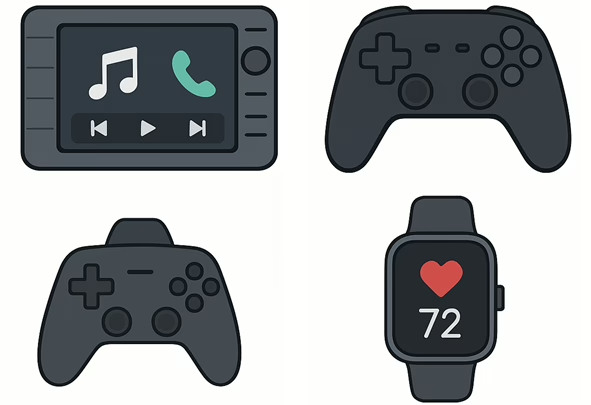
It is also commonly used in cars, where music playback and phone calls must move reliably between a phone and the vehicle. Game controllers rely on classic Bluetooth because button presses and joystick movements need to be transmitted quickly to feel responsive. Some smartwatches and accessories also use it when they remain connected for long periods and exchange frequent updates.
Classic Bluetooth continues to be used because it delivers stable and predictable performance for these ongoing communication needs.
Why was classic Bluetooth created?
Before Bluetooth existed, most devices depended on cables. Connecting a headset, keyboard or accessory often meant finding the right connector and dealing with tangled wires. Manufacturers recognised that people wanted wireless connections that were simple and did not require technical setup.
In the late 1990s, a group of major companies came together to create a shared wireless standard that any device could use. Their goal was to allow devices to connect easily over short distances without the complexity of networking equipment. Early versions improved over time, and by the release of Bluetooth 2.0 and 2.1, classic Bluetooth had become stable, secure and ready for widespread use.
Where does classic Bluetooth operate?
All wireless technologies operate within specific parts of the radio spectrum. Classic Bluetooth uses the 2.4 GHz band, which is available worldwide and shared with many other everyday technologies.
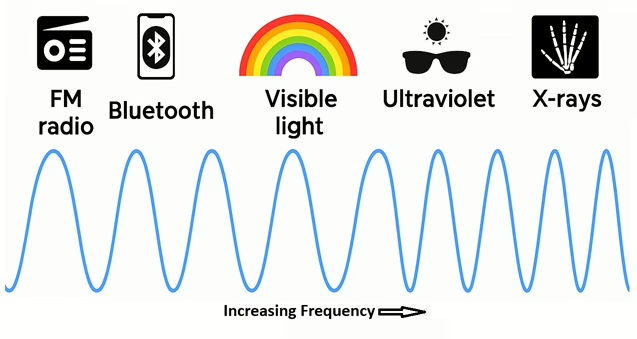
Classic Bluetooth is intended for short range communication, usually within a room or a small area. Devices use low power so portable products like headphones can operate for many hours on a single charge. Another important feature is that no routers or access points are required. Devices connect directly to each other, which keeps setup simple and fast.
How does classic Bluetooth avoid interference?
Because the 2.4 GHz band is shared, Bluetooth must deal with interference from other nearby devices. Classic Bluetooth handles this using a technique called frequency hopping.
Instead of staying on one radio channel, a Bluetooth connection rapidly moves between many small channels. Both devices follow the same hopping pattern so they remain synchronised. If one channel becomes noisy, the connection quickly moves to a clearer one. Each Bluetooth connection uses a different hopping pattern, which reduces interference between multiple Bluetooth links operating in the same space.
This constant movement between channels is one of the key reasons classic Bluetooth works reliably in busy environments like homes, offices and cars.
How do Bluetooth devices find each other?
When you open a Bluetooth settings screen and see a list of nearby devices, your phone or computer is performing a discovery process. It sends out inquiry messages asking which devices nearby are available to connect.
Devices that are set to be discoverable listen for these messages and respond with their unique Bluetooth address and basic information such as their name. Your device collects these responses and displays them as a list. When you select one, the two devices move into a more focused exchange to prepare a connection.
This process can take a few seconds because devices do not listen continuously. They wake up at intervals to conserve power, respond when they detect an inquiry, and then return to waiting.
What is pairing and bonding?
Pairing is the first time setup process that allows two Bluetooth devices to trust each other. During pairing, the devices exchange identity information and generate shared secret keys used to encrypt their communication.
Depending on the type of device, you may be asked to enter a PIN, confirm that two numbers match, or approve the connection with a button press. Once the keys are exchanged, all communication can be encrypted so nearby devices cannot read it.
If both devices store these keys, they become bonded. Bonding allows them to reconnect automatically in the future without repeating the pairing process. This is why your headphones reconnect instantly when you turn them on.
Who controls the Bluetooth connection?
Classic Bluetooth uses a simple structure to organise communication. When devices connect, one becomes the master. This device controls the timing of communication, maintains the Bluetooth clock and defines the frequency hopping pattern.
The other device or devices become slaves. They follow the master’s timing and respond when scheduled. When multiple devices connect to one master, they form a small network called a piconet. A piconet can include up to seven active slave devices.
This structure ensures that devices do not transmit at the same time and that communication remains orderly.
How do devices take turns when talking?
Bluetooth divides time into very small units called time slots. During one time slot, the master sends data. In the next time slot, the slave replies. This rapid back and forth continues throughout the connection.
When larger amounts of data are required, such as during music playback, Bluetooth can combine several time slots into longer packets. This improves efficiency and helps keep audio smooth and consistent.
How does classic Bluetooth carry different kinds of data?
Different types of data have different requirements. Audio needs steady timing and low delay, while control messages and general data prioritise accuracy.
Classic Bluetooth supports these needs by using different internal handling methods. Audio data is given predictable timing so speech and music sound natural. Control data and general information can be resent if necessary to ensure it arrives correctly. Unused time slots are reused so bandwidth is not wasted, allowing multiple functions to share the same connection efficiently.
Bluetooth profiles
Bluetooth profiles define how devices behave for specific tasks. They act as shared rulebooks that ensure devices from different manufacturers understand each other and work together correctly.
| Profile name | What it is used for | What it allows devices to do |
|---|---|---|
| A2DP Advanced Audio Distribution Profile | Streaming high quality audio from one device to another | Allows phones, tablets and computers to send music to headphones or speakers with smooth and consistent playback |
| HFP Hands Free Profile | Managing voice calls between phones and audio devices | Enables hands free calling in cars and headsets including call audio, answering calls and ending calls |
| AVRCP Audio and Video Remote Control Profile | Controlling media playback on another device | Allows headphones, car controls or remotes to play, pause, skip tracks and adjust volume |
| SPP Serial Port Profile | Sending general purpose data between devices | Creates a virtual serial cable used by sensors, embedded systems and simple data applications |
| PBAP Phone Book Access Profile | Accessing contact information from a phone | Allows car systems to display contact names, caller identification and phonebook entries |
| MAP Message Access Profile | Accessing text messages from a phone | Enables cars and other devices to display or read SMS and MMS messages in a hands free way |
These profiles are the reason Bluetooth feels seamless in everyday use. When your headphones control music, your car shows contact names or your headset manages phone calls, a profile defines how that interaction works.
Why is classic Bluetooth still important?
Classic Bluetooth remains important because it supports the data rates required for high quality audio, which continues to be one of the most common Bluetooth uses. Manufacturers have decades of experience building classic Bluetooth chips, making them reliable and cost effective. Millions of existing products depend on classic Bluetooth, so continued support is essential.
The technology has matured into a stable and predictable solution for music, calls and continuous device communication.