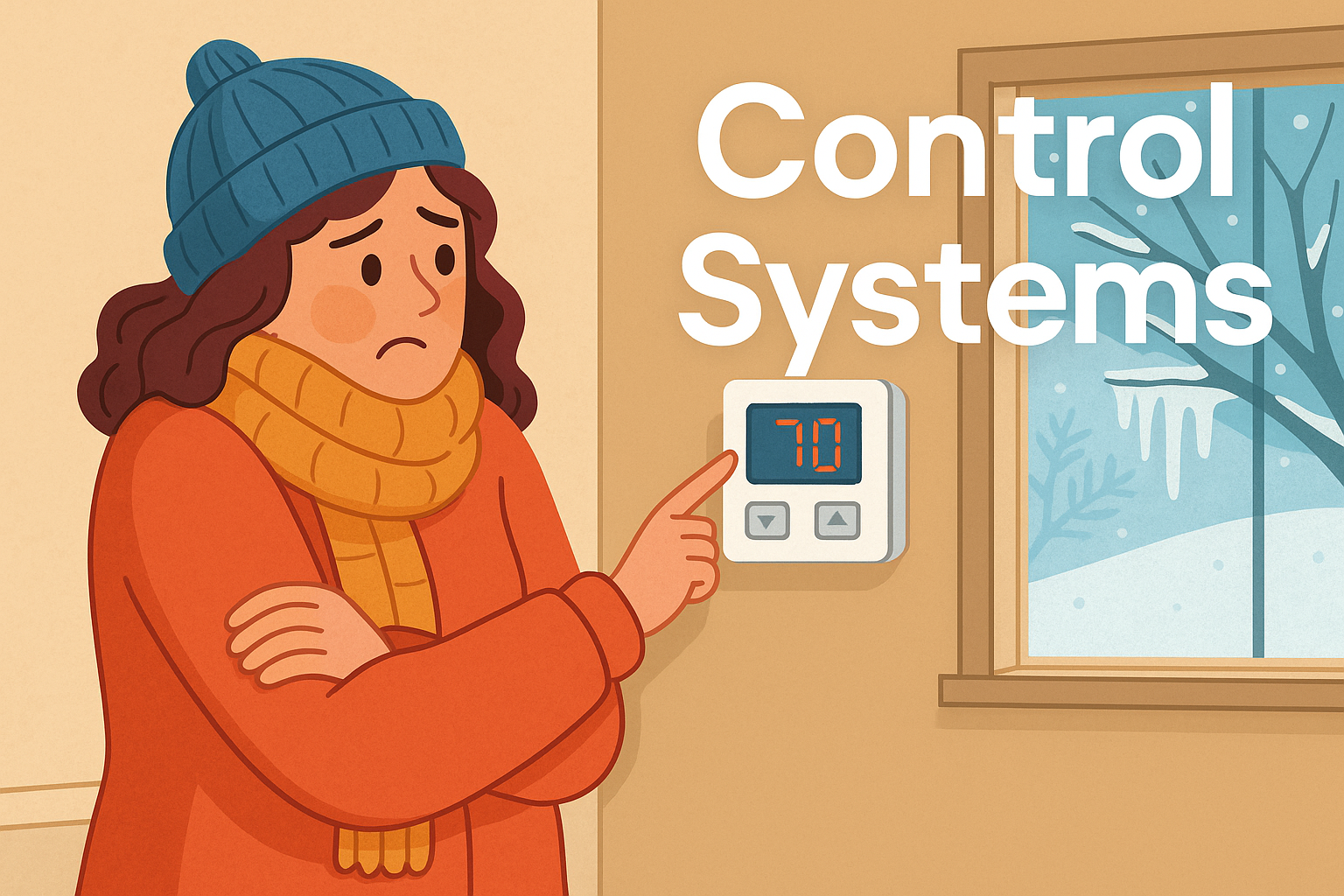
Controllers are one of the unsung heroes of modern technology. They work quietly in the background, making sure systems are stable, accurate, and efficient. From cars and drones to kettles and fridges, controllers are everywhere. But what exactly are they, how do they work, and why are they so important?
What is a Controller?
At its simplest, a controller is a decision-maker. It takes in information about what’s happening, compares it to what should be happening, and decides what to do next.
Think of it like this:
- You’re driving a car and want to stay at 30 mph.
- Your eyes (sensors) check the speedometer.
- Your brain (controller) compares the actual speed to the target.
- Your foot (actuator) presses or eases off the accelerator.
That’s a controller in action! It’s not always a person doing the job — in machines, it’s usually circuits, software, or both.
Why Do We Need Controllers?
Controllers make systems:
- Stable – The system doesn’t wobble around or run out of control. Imagine a crane suddenly swinging side to side every time it lifted something!
- Accurate – The system reaches the exact value you want. A robot arm must stop in just the right spot to pick up an object.
- Robust – The system works even when conditions change. A robot should perform just as well on a smooth tile floor as on a carpet.
- Efficient – The system reaches its goal quickly without wasting energy or time.
Without controllers, machines would overshoot, drift, or fail to adapt to real-life conditions.
Open-Loop vs Closed-Loop Systems
When we talk about controllers, it’s important to understand the difference between open-loop and closed-loop systems. These terms describe whether or not the system uses feedback to check and adjust its behaviour.
Open-Loop Systems
In an open-loop system, the output is not measured or corrected. The system simply follows a set of instructions, no matter what actually happens.
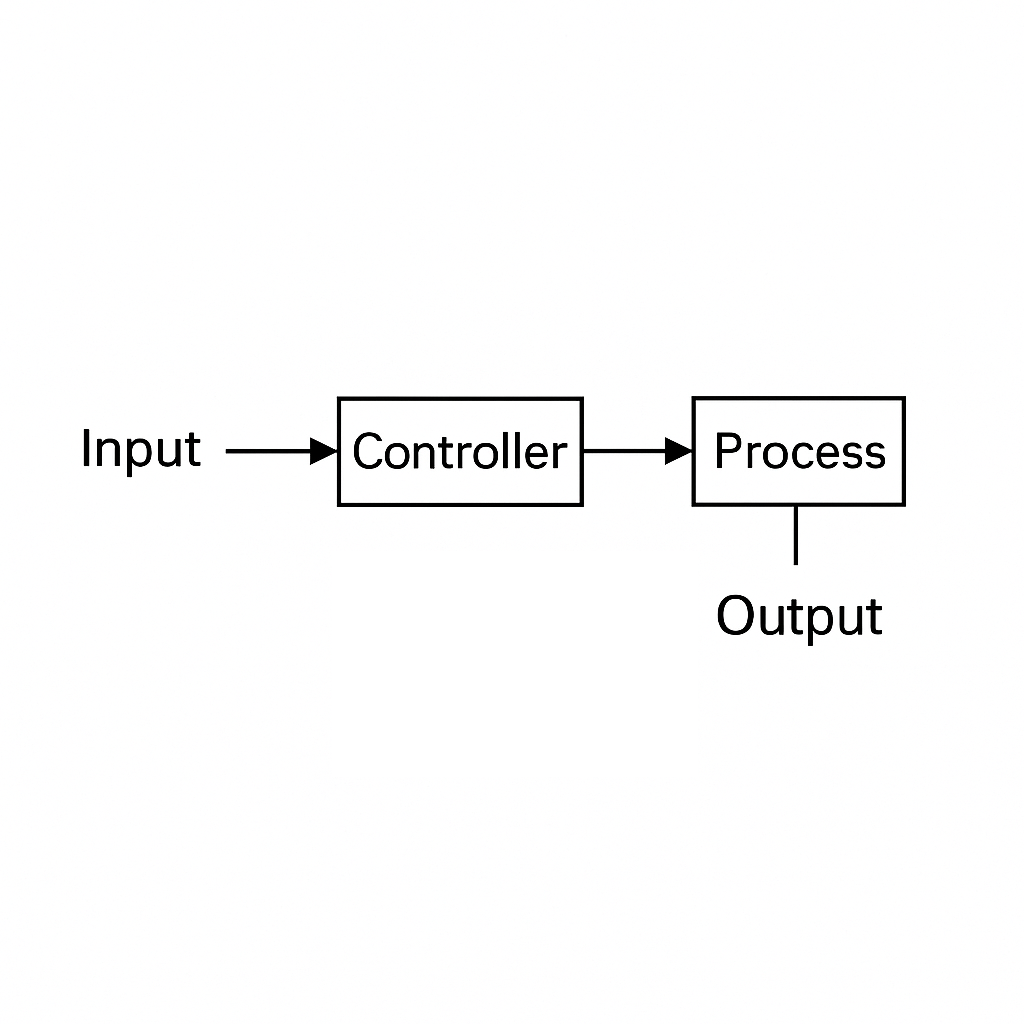
- Analogy: Imagine putting a cake in the oven for 30 minutes without ever checking it. The oven doesn’t know if the cake is fully baked or already burning. It just follows the timer.
- Example: A microwave set to heat food for 2 minutes. It doesn’t know if the food is already hot, still frozen, or somewhere in between — it simply runs for 2 minutes.
Advantages: Simple, cheap, easy to build.
Disadvantages: Inaccurate, can’t adapt to disturbances.
Closed-Loop Systems
A closed-loop system (also called a feedback system) constantly monitors the output and compares it to the target (the set point). If there’s a difference, the controller makes adjustments until the output matches the goal.
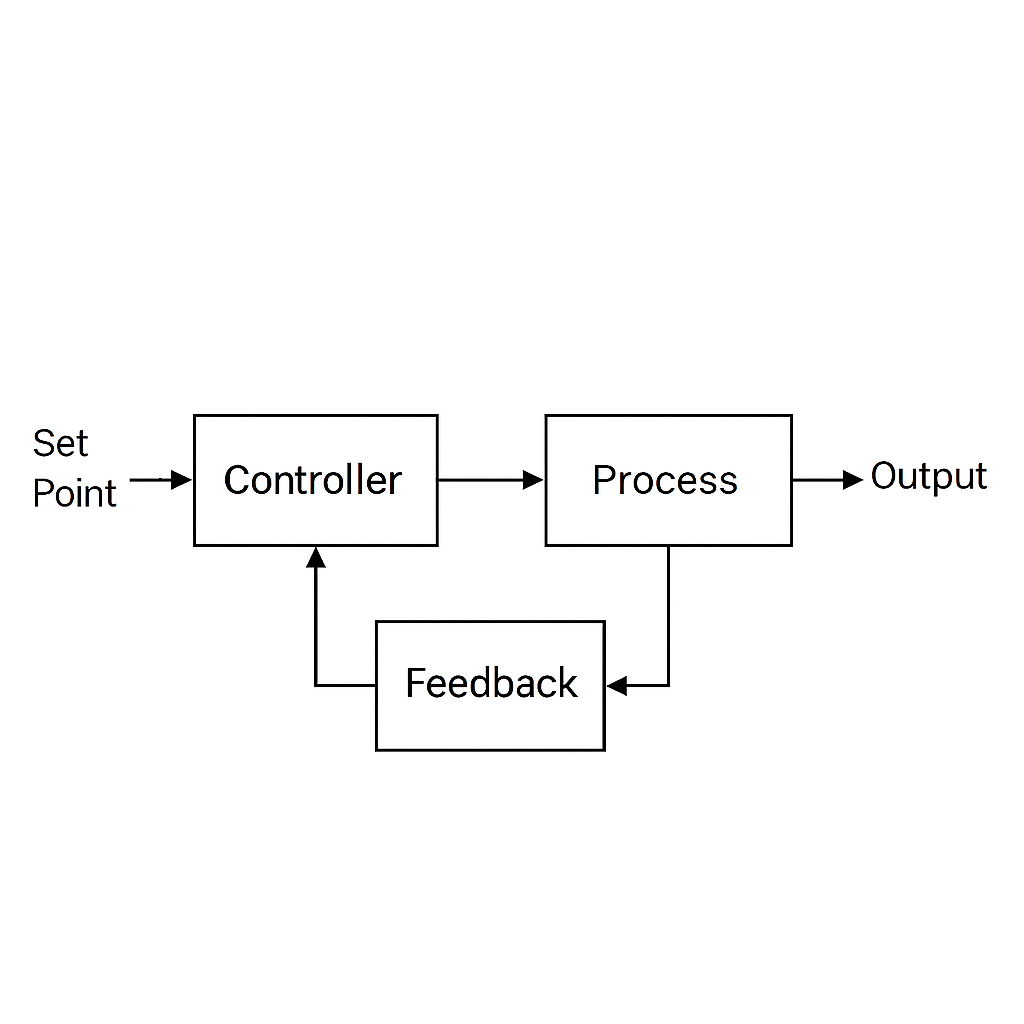
- Analogy: Driving a car at 30 mph. You don’t just press the accelerator and hope for the best. You keep glancing at the speedometer (feedback), then press or release the pedal to stay near 30 mph.
- Example: A thermostat controlling heating. It measures the actual temperature and turns the heater on or off until the room reaches the desired warmth.
Advantages: Accurate, stable, adapts to changes.
Disadvantages: More complex, needs sensors and controllers.
Example: Robot with and without Feedback
Imagine you build a simple robot car and tell it to stop 10 cm from a wall.
- With an open-loop system, the car just drives forward for a set time (say, 2 seconds). If the battery is weak or the floor is slippery, it might stop too far away — or worse, crash into the wall.
- With a closed-loop system, the robot constantly checks its distance from the wall with a sensor. If it’s still too far, it keeps moving. If it overshoots, it reverses slightly until it’s exactly 10 cm away.
This is why feedback matters: it makes systems intelligent and adaptable rather than rigid and error-prone.
Everyday Comparison
| Situation | Open-Loop | Closed-Loop |
|---|---|---|
| Microwave | Heats for 2 minutes regardless of food temperature. | Smart oven that checks internal temperature and stops when food is cooked. |
| Car driving | Push accelerator for 10 seconds and hope you reach 30 mph. | Use cruise control — system monitors speed and adjusts automatically. |
| Shower | Turn tap for “medium hot” and hope it stays the same. | Thermostatic shower that constantly adjusts water mix to keep temperature steady. |
The Building Blocks of a Control System
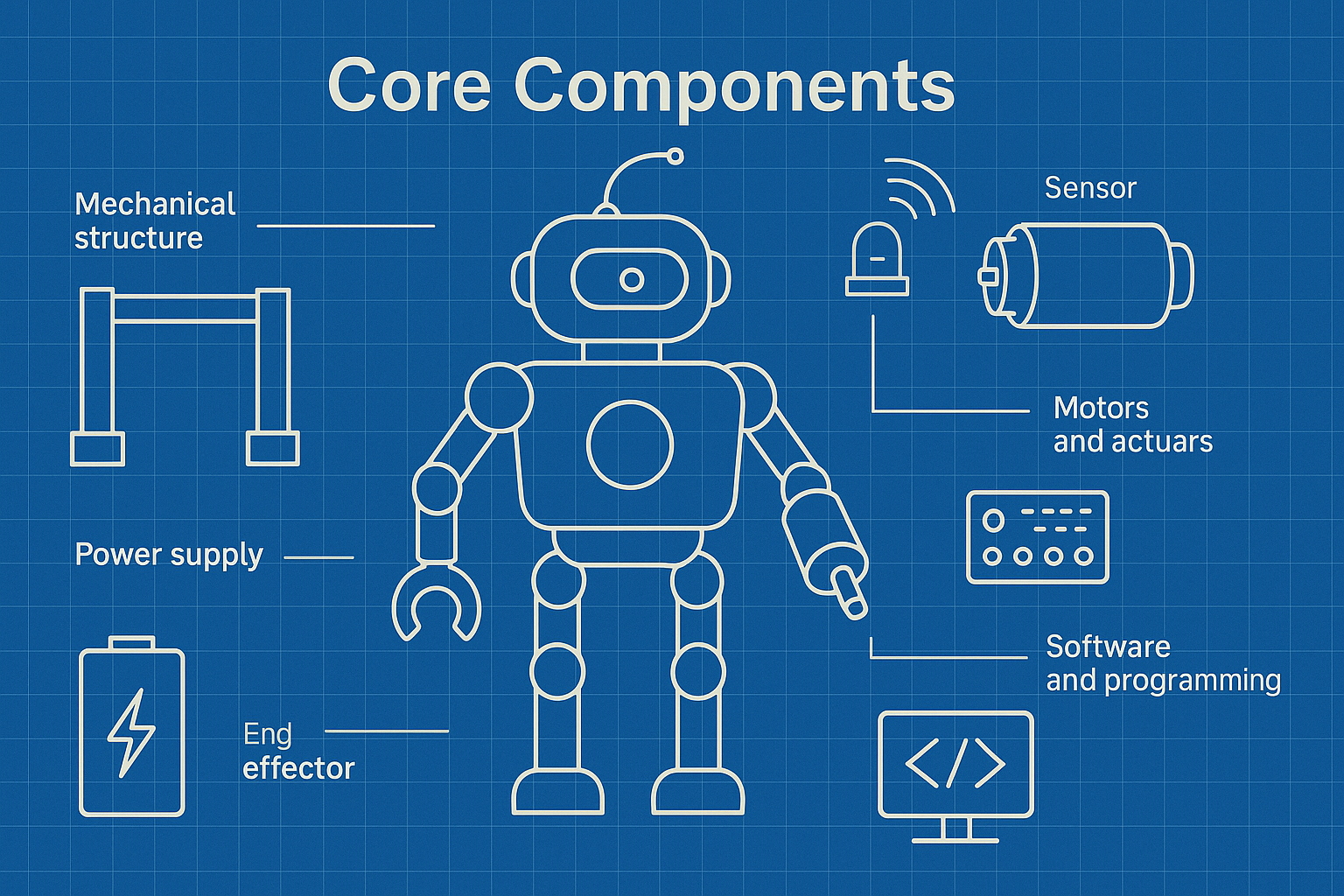
A typical control system has four key parts:
- Sensor – Measures the real situation (e.g. speedometer, thermometer).
- Controller – Works out what needs to change.
- Actuator – Applies the change (e.g. heater, motor).
- Process – The thing being controlled (e.g. room temperature, car speed).
Put together, they form a feedback loop. The controller constantly checks whether the output matches the goal, and makes corrections if it doesn’t.
Types of Controllers
1. Bang-Bang Controller (On/Off)
Bang-Bang controllers are the simplest type. They act like a light switch — either fully on or fully off, with nothing in between. The system turns on when the error is positive and turns off once the target is reached, often overshooting and repeating the cycle.
- Switches fully on or fully off depending on the error.
- Example: A fridge motor turns on when the temperature rises above a set point, then off when it’s cool enough.
Pros: Simple, cheap, easy to build.
Cons: Can cause overshoot and constant switching (oscillation).
2. Proportional (P) Controller
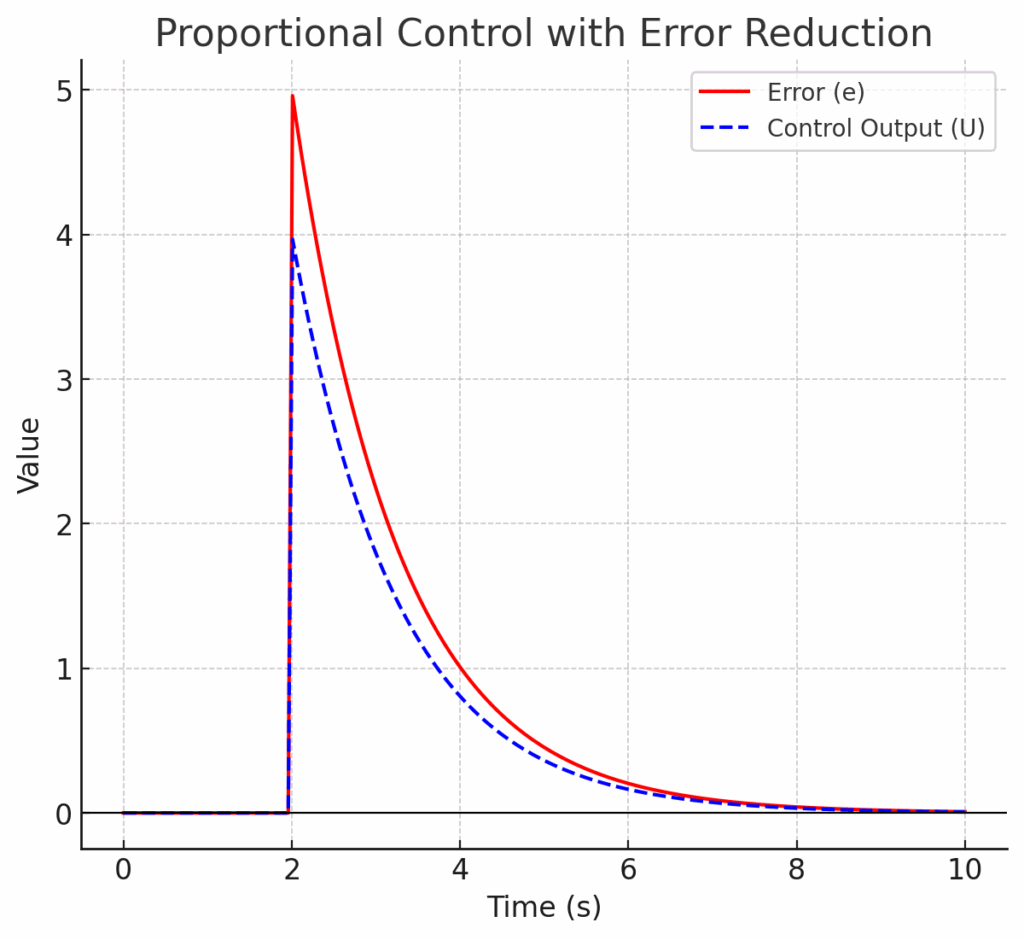
Proportional controllers give an output that’s directly linked to the size of the error. The bigger the error, the stronger the correction. This creates a smoother response than Bang-Bang, but it usually leaves a small gap called steady-state error.
- Adjusts output in proportion to the error.
- Example: Car cruise control — the bigger the speed difference, the harder it accelerates or brakes.
Pros: Smooth and natural response.
Cons: Leaves a small steady-state error.
3. Integral (I) Controller
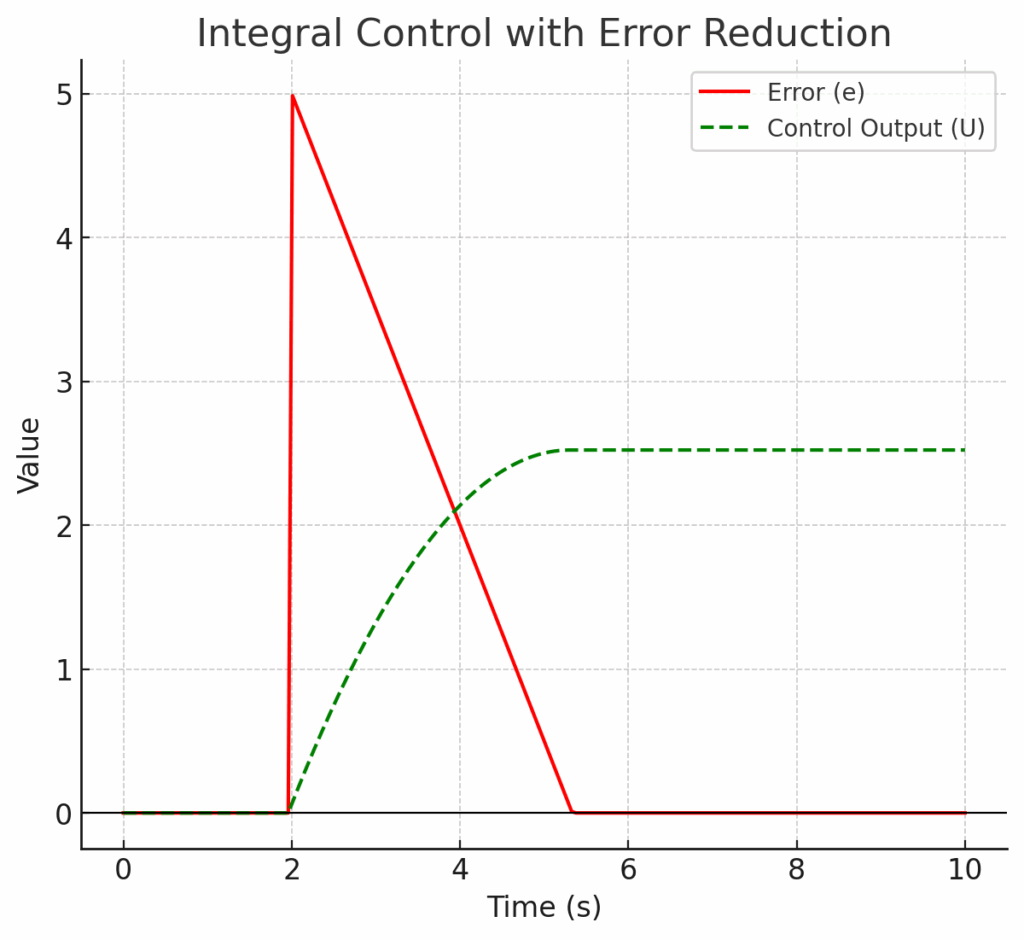
Integral controllers focus on error over time. They keep track of how long and how big the error has been, then build up corrections until the error disappears completely. On their own they respond slowly, but they’re excellent for eliminating long-term drift.
- Looks at the history of error over time.
- Example: A thermostat that notices the room never quite reaches 22°C, so it gradually increases heating until it does.
Pros: Removes steady-state error.
Cons: Slow to respond on its own.
4. Derivative (D) Controller
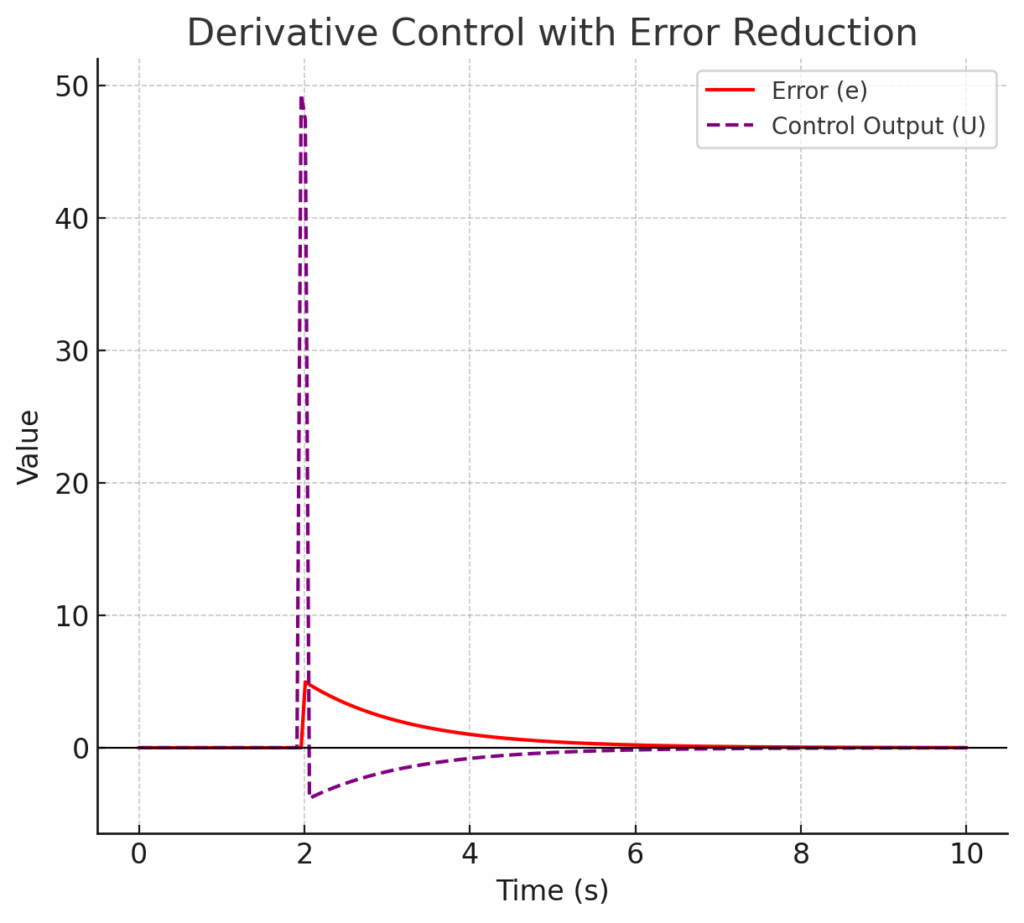
Derivative controllers are like brakes for a system. Instead of looking at the error itself, they look at how quickly the error is changing. This makes them good at predicting future behaviour and preventing overshoot, though they can be sensitive to noisy signals.
- Predicts the future by looking at the rate of change of error.
- Example: In drones, D controllers prevent sudden jerks by damping movements.
Pros: Stops overshoot, smooths response.
Cons: Sensitive to noisy signals.
PID Controllers: The All-Rounders
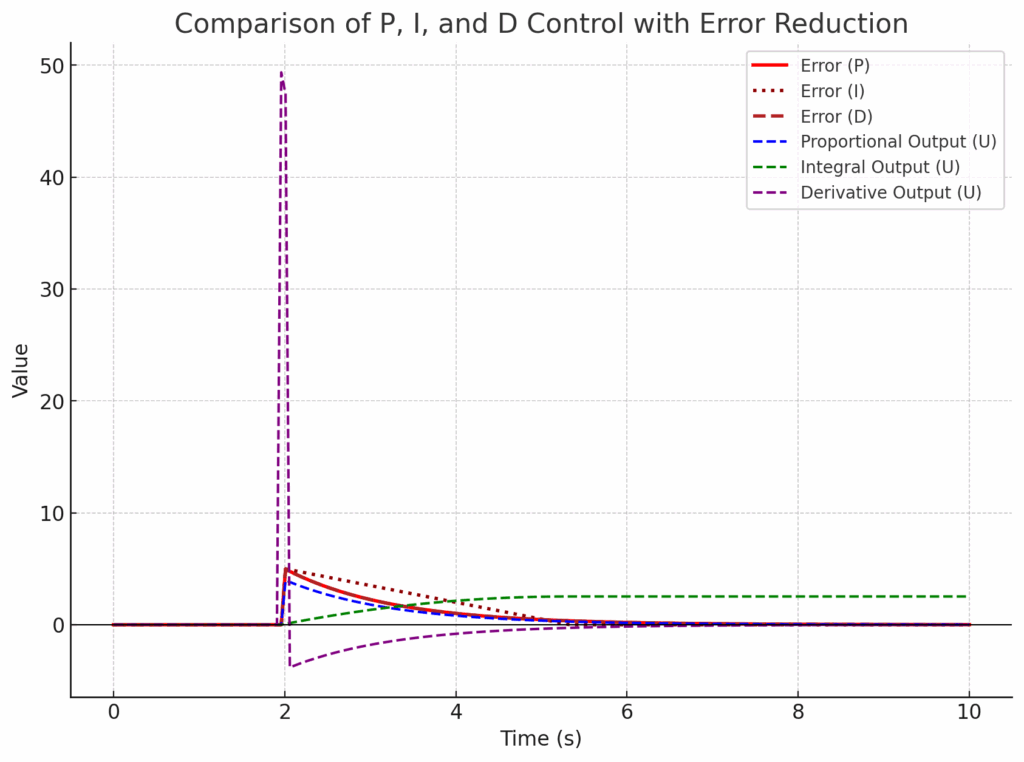
PID controllers are the most widely used type because they combine the strengths of the Proportional, Integral, and Derivative approaches. Instead of relying on just one method, a PID controller balances fast response, accuracy, and stability. By tuning the three constants (Kp, Ki, Kd), engineers can shape how the system behaves.
- P (Proportional): Provides a quick response to big errors.
- I (Integral): Eliminates long-term steady-state errors.
- D (Derivative): Smooths the response and prevents overshoot.
In a PID controller, the three main settings are Kp, Ki, and Kd. These are called the controller “gains” because they decide how strongly each part of the controller reacts. Kp (proportional gain) controls how much the output changes in response to the current error — higher Kp means faster correction, but too much can cause overshoot. Ki (integral gain) looks at the build-up of error over time, helping eliminate long-term drift, though high Ki can cause oscillations. Kd (derivative gain) responds to how quickly the error is changing, acting like a damper to smooth movements, but if it’s too high the system can become sluggish. By tuning Kp, Ki, and Kd together, you can balance speed, accuracy, and stability.
Pros: Highly flexible, accurate, and reliable. Works in everything from cars to drones to industrial machines.
Cons: More complex to design and tune. Sensitive settings may cause instability if not balanced correctly.
Example: Cruise Control in a Car
Imagine you’re driving with cruise control set to 60 mph.
- If Kp is too low, the car reacts very slowly — it crawls toward 60 mph.
- If Kp is too high, the car reacts too aggressively, overshoots 60 mph, then brakes too hard, bouncing above and below the target speed.
- If Ki is added, the system notices if you’re stuck at 58 mph and gradually increases throttle until you’re exactly at 60 mph.
- But if Ki is too high, it starts overcorrecting: it pushes too hard to fix the error, overshoots to 61 mph, then corrects again and drops to 59 mph. This creates a constant wobble around 60 mph, known as oscillation.
- If Kd is added, it acts like a brake — when you’re approaching 60 mph too quickly, it slows the throttle changes to avoid overshoot.
- But if Kd is too high, the car becomes overly cautious. Instead of accelerating strongly to reach 60 mph, it creeps up slowly, taking a long time to settle. This is what we mean by the system becoming sluggish.
By carefully balancing Kp, Ki, and Kd, the car smoothly accelerates to 60 mph, stays there even when the road goes uphill or downhill, and avoids jerky movements.
👉 This balance is the secret of PID controllers: too little or too much of any one term can make the system unstable, wobbly, or slow.
Everyday Examples
Controllers might sound technical, but you use them every day without noticing:
- Thermostat in your home heating system.
- Cruise control in cars.
- Autopilot in planes.
- Balancing systems in Segways and hoverboards.
- Speed regulators in fans or washing machines.
Key Takeaways
- Controllers reduce error by comparing what you want with what you have.
- They make systems stable, accurate, robust, and efficient.
- Different types (Bang-Bang, P, I, D) each have strengths and weaknesses.
- PID controllers combine the best of all worlds and are used almost everywhere.
- Controllers are methods; microcontrollers are hardware that run those methods.
Without controllers, automation would simply not work. Next time you use cruise control, a thermostat, or even your washing machine, you’ll know there’s a controller quietly keeping things under control.