I seem to start every one of these posts by saying it’s been a busy few weeks, and this month has been no exception! Although, strangely, it sometimes feels as though progress has slowed down a little.
I think that’s partly because I’ve reached a different stage in the journey. Rather than making big changes or adding major new pieces of hardware, I’m now spending more time polishing what I’ve already built, ironing out the remaining issues and adding some of the extra functionality I’ve had on my wish list for a while.
And looking back at what’s happened over the last few weeks, perhaps things haven’t slowed down quite as much as I thought!
A little less flicker, a lot more stability
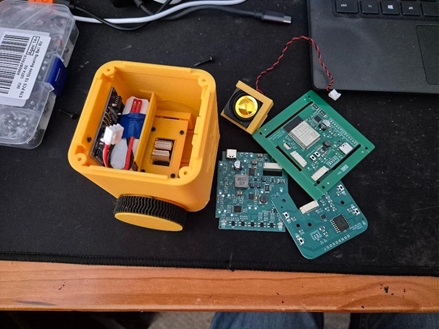
One of the biggest milestones has been getting the latest set of circuit boards up and running. I now have PCBs for five robots, and they’ve successfully addressed many of the problems I discovered with the previous iteration.
The power supply is much more stable, the annoying screen flicker has finally disappeared, and the new motor driver is working properly. I’ve also improved how the robots detect problems, so conditions such as overheating or a stalled motor can now be identified almost immediately.
Even better, the problems that prompted these changes haven’t reappeared in testing.
It’s not quite as exciting as watching a robot dance around the room, but getting the fundamentals right is incredibly important, particularly when the robots are eventually going to be used by children in busy classrooms.
Santa, Rudolph and a little creativity
With Christmas approaching, I’m currently building a Santa and Rudolph robot in preparation for another school visit in December.
This time I’ll be working with much younger children, which has encouraged me to think a little differently about how they might interact with the robots.
When I first spoke to the teacher earlier in the year, she suggested that it would be lovely if children could create their own pictures and display them on the robot’s screen. I thought it was a great idea, but at the time there were rather more pressing things to get working!
Well, I’ve finally got around to it.
Tinkiblocks now includes a simple image editor where children can draw their own pictures, upload them to a Tinkibot and then use those images within their Scratch-style programs.
I’m particularly excited about this because it gives younger children another way to be creative without needing to understand lots of programming concepts first. They can start by drawing something, see it appear on a real robot, and then gradually explore how to bring it to life through code.
I’ve also added the ability for the robots to play musical notes and synthesise different drum sounds. These work in much the same way as the music blocks in Scratch, so children who have used Scratch before should find them familiar.
I’m hoping that combining pictures, sounds and movement will give the children plenty of opportunities to experiment and have some fun.
And who knows, perhaps we’ll end up with Santa and Rudolph putting on a Christmas performance!
More opportunities to get into classrooms
One particularly lovely bit of news is that I’ve been invited to take part in a computing event next year involving several schools from a Multi-Academy Trust.
Naturally, my answer was a very enthusiastic YES!
It’s a fantastic opportunity to get Tinkibots in front of more children and teachers, see how they respond, and gather some valuable feedback.
I’m also hoping my daughter will be able to come along and help me run the workshops. This is something I’m especially looking forward to.
When she was younger, we spent lots of time playing around with Scratch together, creating little programs and experimenting with what we could make. Those are some really fond memories for both of us, and the idea of working alongside her again to help another generation of children discover programming feels rather special.
It would be lovely to bring that part of the journey full circle.
Seven robots and counting
I now have seven robots that I consider ready for pilot sessions, which feels like a pretty significant milestone.
There will always be things to improve (I suspect that list will never get any shorter!), but I feel I’ve reached the point where the most valuable thing I can do is get the robots into the hands of the people they’re being designed for.
My focus over the coming months will increasingly be on reaching out to schools, clubs and other organisations, arranging more pilot sessions and, most importantly, listening to feedback.
I’m also hoping to secure some letters of intent from organisations interested in using Tinkimo. These would be enormously helpful when it comes to the next big challenge: funding.
Because, as much as I love building robots, it’s becoming a rather expensive hobby!
Tinkimo becomes a company
After months of deliberating about when the right moment would be, I’ve finally taken the plunge and registered Tinkimo as a limited company.
It’s something I’ve been considering for quite a while, but I wanted to feel that the project had reached a stage where it made sense.
There were a couple of things that finally nudged me into making the decision.
Firstly, many of the grants and funding opportunities I’ve been looking at are aimed at registered businesses. If Tinkimo is going to grow beyond the robots I’ve been building myself, securing funding is going to become increasingly important.
The second reason was an opportunity to work with students from the University of Plymouth through their micro-internship programme.
I’d originally hoped to welcome some students this year, but personal circumstances meant I’ve moved that ambition to the spring intake instead.
I’m genuinely excited about the possibility.
One of the values I’ve wanted to build into Tinkimo from the beginning is the idea of lifting people up and creating opportunities. Working with students who are finding their feet, building confidence and gaining experience feels like a wonderful way of putting that into practice.
I hope they’ll get something meaningful from the experience, and I’m sure I’ll learn plenty from them too.
Making it easier to connect
There’s also been quite a bit of work happening behind the scenes on the software side.
One of the challenges I’ve encountered when talking to schools is that installing software on school laptops isn’t always straightforward. Understandably, IT teams need to be careful about what gets installed and how devices communicate.
I’ve been working on making the Tinkiblocks editor, which runs directly from the Tinkimo website, work with the local proxy software that handles communication with the robots.
I’ve also extended the little Tinkimodem I’ve been developing so that it can do the job of the proxy itself.
Using Web Serial, the browser can communicate directly with the modem over USB, which should make getting started considerably easier. Rather than needing to install additional software, the hope is that children can simply open the website, connect the modem and start programming.
There’s another rather exciting advantage too: a single modem can communicate with multiple robots.
That fits nicely with one of my longer-term ambitions for Tinkimo, which is to enable games and challenges involving multiple robots, potentially even between different classrooms.
There’s still work to do, but it feels like another important piece of the puzzle is falling into place.
Looking beyond Scratch
Another interesting development came out of a conversation with Tech Cornwall at the Life in AI workshop about how Tinkimo might be used with older students.
Most of my attention so far has been on making programming accessible to younger children through Scratch-style blocks. But there’s no reason the robots should stop being useful once those children are ready to move on to text-based programming languages.
With that in mind, I’ve been changing the way Tinkiblocks and the robots communicate, introducing a JSON-based protocol.
It’s a fairly technical change that probably won’t be particularly noticeable to someone using the blocks, but it lays the groundwork for students to communicate with the robots from other programming languages.
I still need to explore what that experience should look like, but I really like the idea that a child could start their programming journey using Scratch and eventually move on to Python or another language while continuing to use the same robot.
There’s also another opportunity to take things further through the new expansion port I’ve added to the robots. This opens up the possibility of connecting additional sensors, electronics and other devices, allowing older students to experiment with extending the robot’s capabilities rather than simply using what’s already built in.
I love the idea that students could eventually design and build their own additions, learning about electronics and hardware alongside their programming. It could turn Tinkimo from something they learn to program into something they can genuinely tinker with and make their own.
After all, learning to program shouldn’t mean having to start again with completely different hardware every time you take a step forward.
The next chapter
Looking back, I think my feeling that progress has slowed is really just a reflection of how much the project has changed.
In the early days, progress was easy to see. A motor turning for the first time, a screen lighting up, or a robot finally moving in a straight line all felt like enormous achievements.
Now, progress is often less visible. It’s about making things reliable, removing barriers, making the software easier to use and creating opportunities for children to get involved.
And perhaps that’s the biggest change of all.
Tinkimo is slowly moving from being something I build and experiment with at home into something that other people can use, enjoy and hopefully learn from.
There are still plenty of challenges ahead, not least finding the funding to take things further, but having seven robots ready to go, another school visit on the horizon and opportunities to work with more students and teachers makes it all feel a little more real.
Now I just need to get Santa and Rudolph ready for their first classroom appearance!
Terri